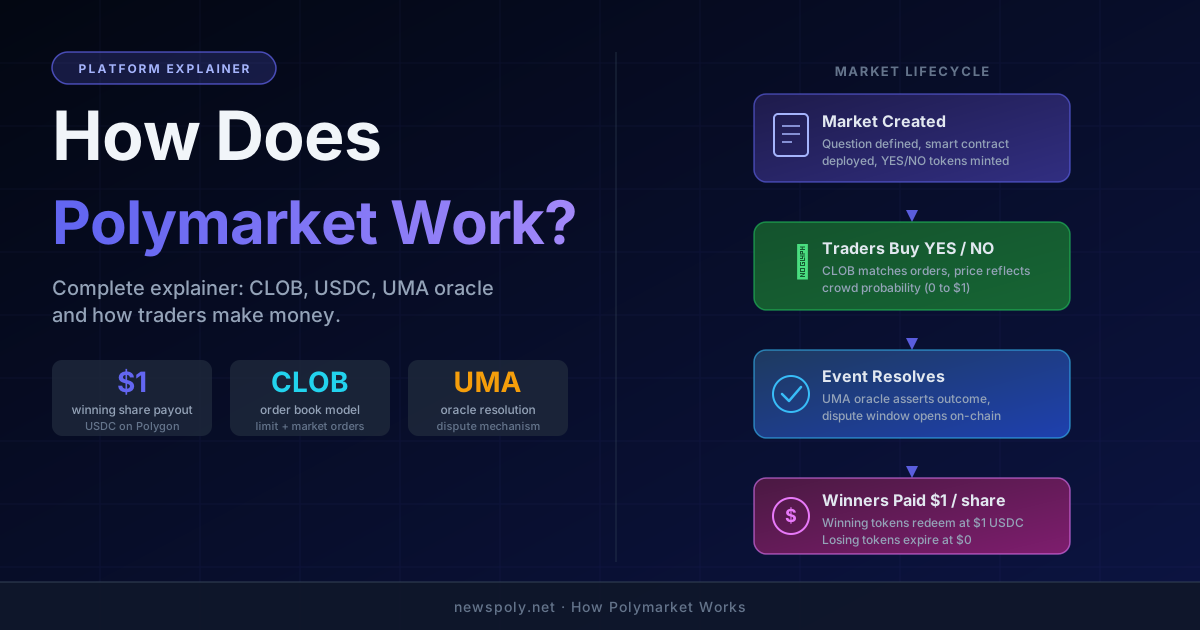
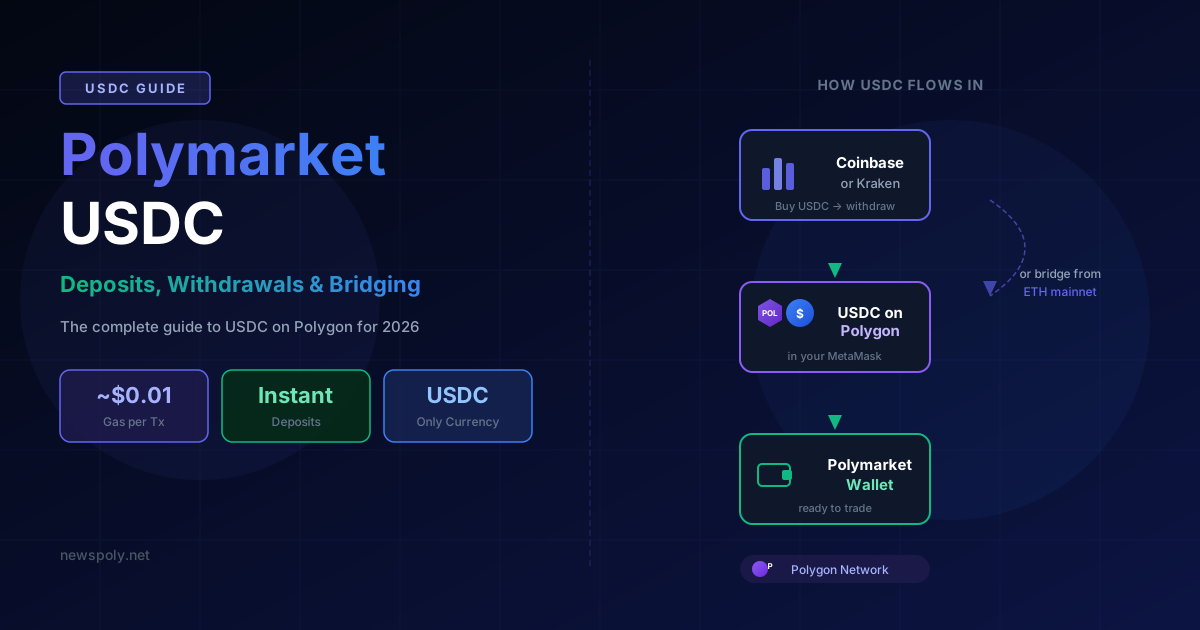
Every dollar you trade on Polymarket is denominated in USDC — Circle's USD-pegged stablecoin running on the Polygon blockchain. You cannot deposit ETH, Bitcoin, or any other asset directly. Understanding how USDC flows into and out of Polymarket is the single most important operational skill for any trader on the platform. If you are brand new to Polymarket, read our beginner's guide first before tackling the USDC mechanics. This guide covers everything: what USDC is, why Polymarket chose Polygon, how to acquire USDC on the right network, how to deposit and withdraw, and the costly mistakes that trip up thousands of new users every month.
What Is USDC?
USDC (USD Coin) is a regulated stablecoin issued by Circle. Each USDC token is backed 1:1 by US dollars or short-term US Treasury instruments held in reserve and audited monthly. Unlike algorithmic stablecoins, USDC has maintained its peg consistently since launch and is redeemable directly through Circle for US dollars.
USDC exists on multiple blockchains: Ethereum mainnet, Polygon, Solana, Arbitrum, Base, Avalanche, and others. The token ticker is the same on every chain — USDC — but the tokens are not interchangeable without bridging. Sending Ethereum-mainnet USDC to a Polygon address does not work; you will receive nothing on Polygon and may lose your funds permanently.
This cross-chain distinction is the root cause of the majority of Polymarket deposit problems. Keep it in mind throughout this guide.
Why Polymarket Uses USDC on Polygon
Polymarket launched on the Polygon network for practical economic reasons:
- Near-zero gas fees. A transaction on Polygon costs roughly $0.001–$0.01 in MATIC. The same transaction on Ethereum mainnet could cost $5–$50 or more during congestion. On a prediction market where you might resolve dozens of positions, mainnet fees would consume a significant portion of your profits.
- Fast finality. Polygon blocks confirm in approximately 2 seconds. Trades on Polymarket execute and resolve without the multi-minute wait times associated with Ethereum mainnet.
- Scalability. Polygon can process thousands of transactions per second, which matters for a platform with hundreds of active markets and many concurrent traders.
- USDC liquidity. Circle's native USDC has deep liquidity on Polygon, making it the natural settlement currency for a DeFi-native prediction market.
Polymarket does not use ETH as a trading currency. ETH is only used indirectly — and only on Ethereum mainnet, never inside Polymarket itself. MATIC (Polygon's native token) is used solely to pay gas fees, not for trading.
Already have USDC on Polymarket? Put it to work automatically. PolyCopyTrade connects to your wallet and copies the highest-performing traders — your USDC, fully under your control.
How to Get USDC on Polygon — Method 1: Buy Directly on an Exchange
The simplest and most reliable method is to buy USDC on a centralized exchange that supports direct Polygon withdrawals. Coinbase and Kraken both offer this.
Using Coinbase
- Log in to Coinbase and complete any required KYC verification.
- Buy USDC using your bank account, debit card, or existing crypto balance.
- Click Send/Receive and enter your MetaMask wallet address.
- Before confirming, click Network and select Polygon. This is the critical step — the default is often Ethereum mainnet.
- Confirm the transaction. USDC will arrive in your MetaMask Polygon wallet within minutes.
Using Kraken
- Log in to Kraken and navigate to Funding > Withdraw.
- Search for USDC and select it.
- In the network selector, choose Polygon (MATIC).
- Enter your MetaMask address, set the amount, and confirm.
Important: Always double-check the withdrawal network before confirming. Exchanges default to different networks depending on their configuration. If you select the wrong network, your USDC will arrive on Ethereum mainnet and you will need to bridge it (see Method 2 below).
After the withdrawal arrives, open MetaMask, switch the network to Polygon Mainnet, and confirm your USDC balance appears. If MetaMask does not show Polygon by default, add it manually via ChainList.org. For a full walkthrough of MetaMask setup specifically for Polymarket, see our Polymarket MetaMask guide.
How to Get USDC on Polygon — Method 2: Bridge from Ethereum Mainnet
If you already have USDC on Ethereum mainnet and want to move it to Polygon, you need to bridge it. The official tool is the Polygon Bridge.
- Go to portal.polygon.technology and connect your MetaMask wallet.
- Make sure MetaMask is set to Ethereum mainnet.
- Select USDC as the token and enter the amount to bridge.
- Click Transfer and approve two transactions in MetaMask: first the token approval, then the bridge deposit. Both require ETH for gas on mainnet.
- Wait for the bridge to process. The Polygon PoS bridge typically takes 7–10 minutes for the deposit to appear on Polygon.
- Switch MetaMask to Polygon Mainnet to confirm your USDC balance.
Note: bridging requires ETH to pay gas on Ethereum mainnet (typically $2–$15 depending on congestion), plus you need a small amount of MATIC already on Polygon for any future Polygon transactions. The bridge itself is free — you pay only gas.
Third-party cross-chain aggregators like Jumper Exchange or LI.FI can also bridge USDC from multiple source chains and often find cheaper or faster routes than the native Polygon Bridge.
How to Deposit USDC into Polymarket
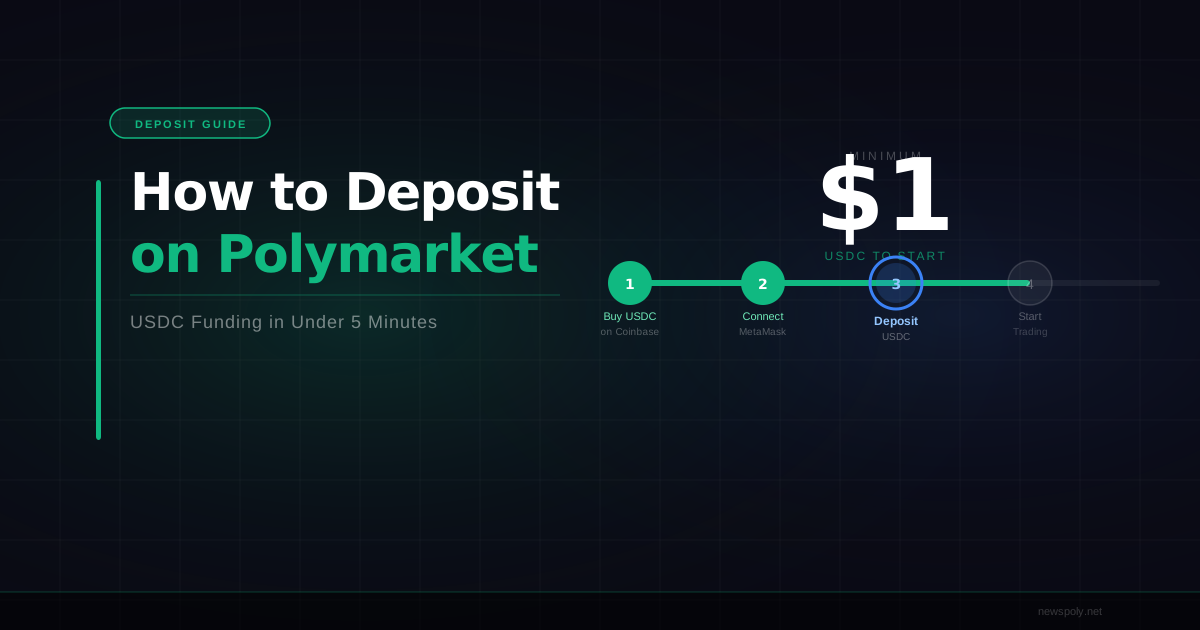
With USDC on Polygon in your MetaMask wallet, depositing into Polymarket takes under two minutes.
- Go to polymarket.com and click Connect Wallet in the top right.
- Select MetaMask (or WalletConnect for mobile wallets).
- Approve the connection in MetaMask. Polymarket will ask you to sign a message — this does not cost gas and does not move any funds.
- Click your profile icon and select Deposit.
- Enter the USDC amount you want to deposit and click Deposit.
- MetaMask will prompt you to approve the USDC spend (one-time allowance transaction, costs ~$0.001 in MATIC).
- MetaMask will then prompt you to confirm the actual deposit transaction (costs ~$0.005 in MATIC).
- Your Polymarket balance updates within seconds.
Total cost for a deposit: approximately $0.01 in MATIC or less. This is negligible for any deposit size.
You must have a small MATIC balance in your MetaMask Polygon wallet to pay these gas fees. If you have zero MATIC, your transaction will fail. See the gas fee section below for how to get MATIC.
How to Withdraw USDC from Polymarket
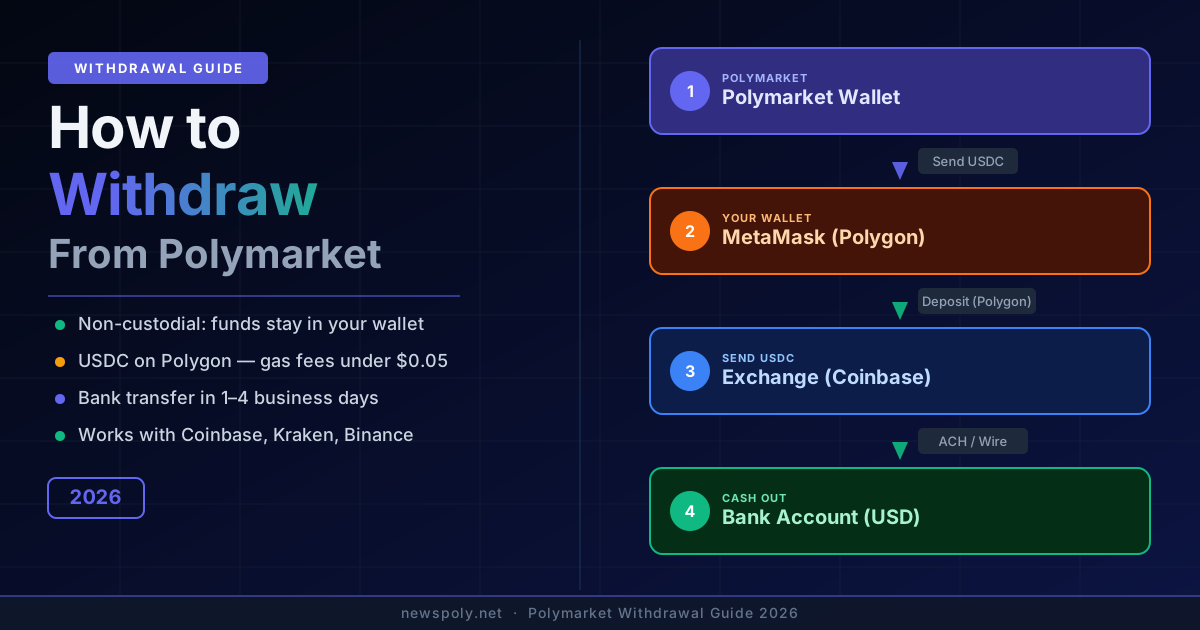
Withdrawing from Polymarket sends USDC back to your MetaMask wallet on Polygon. From there you can either keep it on Polygon, bridge it to Ethereum, or withdraw to a centralized exchange. For a dedicated step-by-step walkthrough, see our guide to withdrawing from Polymarket. For detail on how winnings are calculated, fees deducted, and payouts timed at market resolution, see our guide to how Polymarket payouts work.
- On Polymarket, click your profile icon and select Withdraw.
- Enter the amount of USDC to withdraw.
- Confirm the transaction in MetaMask (gas cost: ~$0.005 in MATIC).
- USDC appears in your MetaMask Polygon wallet within seconds.
To move your USDC to a centralized exchange:
- Log in to Coinbase, Kraken, or your preferred exchange.
- Navigate to Deposit > USDC and select Polygon as the deposit network.
- Copy the deposit address provided by the exchange.
- In MetaMask (on Polygon network), send your USDC to that address.
- The exchange will credit your account within minutes.
Always verify the exchange supports Polygon USDC deposits before sending. Most major exchanges do, but smaller platforms may only support Ethereum mainnet. Check this before every withdrawal.
Tired of manually managing your Polymarket positions? PolyCopyTrade automates your strategy by mirroring the top traders on the platform — no constant monitoring required, and your USDC stays in your own wallet at all times.
USDC Minimum Deposit and Withdrawal Amounts
Polymarket does not enforce a hard minimum deposit amount at the contract level, but practically speaking (for a full breakdown of sensible starting amounts, see our Polymarket minimum deposit guide):
- Deposits: Any amount works technically, but depositing less than $5 is rarely worthwhile given that even a single trade will represent a significant portion of your balance.
- Withdrawals: No enforced minimum, but the gas cost (~$0.01) is the same regardless of amount. Withdrawing $0.50 in USDC is technically possible but inefficient.
- Practical floor: Most traders deposit at least $20–$50 to have meaningful exposure across multiple markets.
There is no maximum deposit limit enforced by the protocol. Whale traders routinely hold six-figure USDC balances on Polymarket.
How Long Do Deposits and Withdrawals Take?
Polymarket's speed on Polygon is one of its strongest practical advantages:
- Deposits (from MetaMask Polygon wallet): Near-instant. Funds typically appear in your Polymarket balance within 5–15 seconds of transaction confirmation.
- Withdrawals (to MetaMask Polygon wallet): Near-instant. Same 5–15 second range.
- Exchange to MetaMask (Polygon withdrawal from Coinbase/Kraken): 1–5 minutes typically, depending on the exchange's processing queue.
- Polygon Bridge (Ethereum mainnet to Polygon): 7–10 minutes for the PoS bridge.
- Bridge in reverse (Polygon to Ethereum mainnet): Up to 3 hours for the standard PoS bridge. For faster exits, use a third-party bridge aggregator.
If a deposit takes longer than 30 minutes and you can see the transaction confirmed on PolygonScan, contact Polymarket support. For deeper on-chain analysis beyond basic transaction tracking, see the Polymarket API and on-chain data guide. Confirmed transactions are very rarely stuck permanently — most delays are display/caching issues on the Polymarket frontend.
Gas Fees on Polygon — What to Expect
Gas on Polygon is paid in MATIC, not USDC. This surprises many users who assume their USDC balance can pay for transactions. It cannot — you always need a separate MATIC balance for gas.
Current (2026) gas cost estimates for common Polymarket actions:
- USDC approval: ~$0.001
- Deposit to Polymarket: ~$0.003–$0.008
- Withdrawal from Polymarket: ~$0.003–$0.008
- Token transfer between wallets: ~$0.001–$0.005
A single MATIC token (typically priced between $0.10–$1.00) is enough to cover hundreds of Polymarket transactions. You can acquire MATIC by:
- Buying MATIC on Coinbase, Kraken, or Binance and withdrawing to Polygon.
- Using Polygon's own faucet for a tiny amount (just enough for initial gas).
- Some wallets include a MATIC "gas station" feature that swaps a small amount of your USDC for MATIC automatically.
If you have zero MATIC and cannot afford gas, you are stuck — you cannot even approve USDC without MATIC. Acquire a small MATIC balance before you try to use Polymarket for the first time.
Can You Use Coinbase Pay or an On-Ramp?
Yes. Polymarket includes a built-in fiat on-ramp that lets you buy USDC directly with a credit card or bank account without leaving the platform. The on-ramp is powered by third-party providers including MoonPay and Coinbase Pay.
To use it:
- Connect your wallet on Polymarket.
- Click Deposit and select Buy with Card or Buy with Coinbase Pay.
- Enter the USD amount you want to add.
- Complete the KYC/card verification on the provider's interface (first-time only).
- USDC is purchased and deposited directly to your Polymarket balance — no bridging or MetaMask interaction required for the on-ramp itself.
The on-ramp is the easiest entry point for users who are new to crypto entirely. The tradeoff is that on-ramp providers charge a fee (typically 1–4% depending on payment method) versus the near-zero cost of withdrawing from a centralized exchange you already use.
Common USDC Mistakes on Polymarket
These are the most frequent errors that cause lost funds or failed transactions:
- Sending Ethereum mainnet USDC to your Polygon wallet address. Your Ethereum and Polygon addresses look identical, but the funds land on the wrong chain. To recover them, you must bridge from Ethereum mainnet to Polygon after the fact. Your funds are not lost, just stranded on Ethereum — but you need ETH for gas to move them.
- No MATIC for gas. This is the most common first-time failure. Always acquire a small MATIC balance before your first deposit attempt.
- Withdrawing USDC from an exchange on the wrong network. If your exchange defaults to Ethereum or another chain, your USDC lands somewhere other than Polygon. Check the network selector on every withdrawal.
- Sending USDC directly to Polymarket's smart contract address. Do not manually send USDC to any contract address. Always use Polymarket's deposit interface.
- Using a hardware wallet without Polygon network configured. Ledger and Trezor require manual Polygon network configuration. If your hardware wallet is not configured for Polygon, your transaction will fail or show incorrect data.
- Expecting instant bridge finality. The Polygon PoS bridge takes up to 10 minutes. Do not panic if funds have not appeared after 2 minutes — check PolygonScan for transaction status first.
Once your USDC is funded and ready, the next step is finding profitable opportunities. PolyCopyTrade analyzes on-chain trading history and lets you automatically follow wallets with the strongest track records — so your capital is always working, even when you are not watching.
Frequently Asked Questions
Can I use USDT instead of USDC on Polymarket?
No. Polymarket exclusively uses USDC. USDT (Tether) is not accepted. If you have USDT and want to use Polymarket, you must first swap it to USDC on a DEX like Uniswap (on Polygon) or on a centralized exchange before depositing.
What happens to my USDC if Polymarket shuts down?
Polymarket is a non-custodial protocol. Your USDC is held in smart contracts on the Polygon blockchain, not in a company-controlled bank account. If Polymarket's frontend goes offline, you can still interact with the underlying smart contracts directly and withdraw your funds. This is one of the key advantages of a decentralized architecture over traditional prediction market operators.
Is there a way to use Polymarket without MetaMask?
Yes. Polymarket supports WalletConnect, which is compatible with mobile wallets including Coinbase Wallet, Trust Wallet, Rainbow, and many others. For email-based onboarding, Polymarket also supports social login options that create a non-custodial wallet behind the scenes. The underlying mechanics are the same — USDC on Polygon, gas in MATIC — regardless of which wallet interface you use. For mobile-specific guidance, see our article on whether Polymarket has an app.
Do I pay Polymarket any fees on deposits or withdrawals?
Polymarket itself charges no fees on deposits or withdrawals. The only costs are Polygon gas fees (fractions of a cent in MATIC) and, if applicable, the bridging or exchange withdrawal fees charged by third-party services. Polymarket's revenue model is based on a trading fee applied when you win a position, not on moving funds in or out of the platform. Depending on your jurisdiction, those winnings may also have tax implications — our Polymarket tax guide covers US and UK treatment, record-keeping, and on-chain reporting considerations.