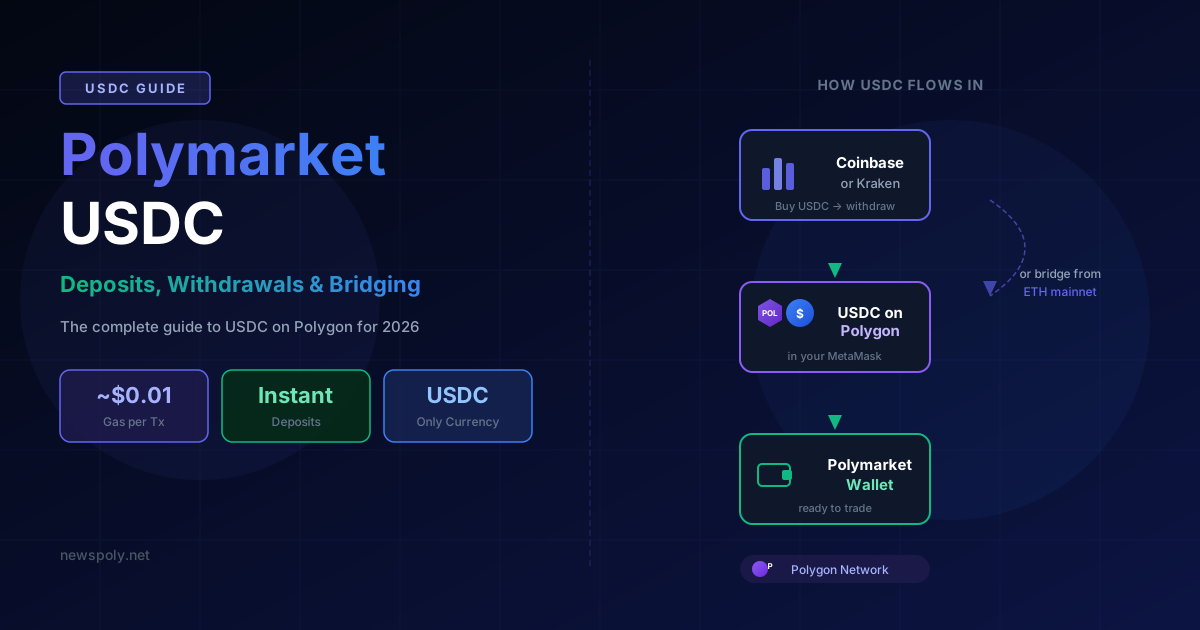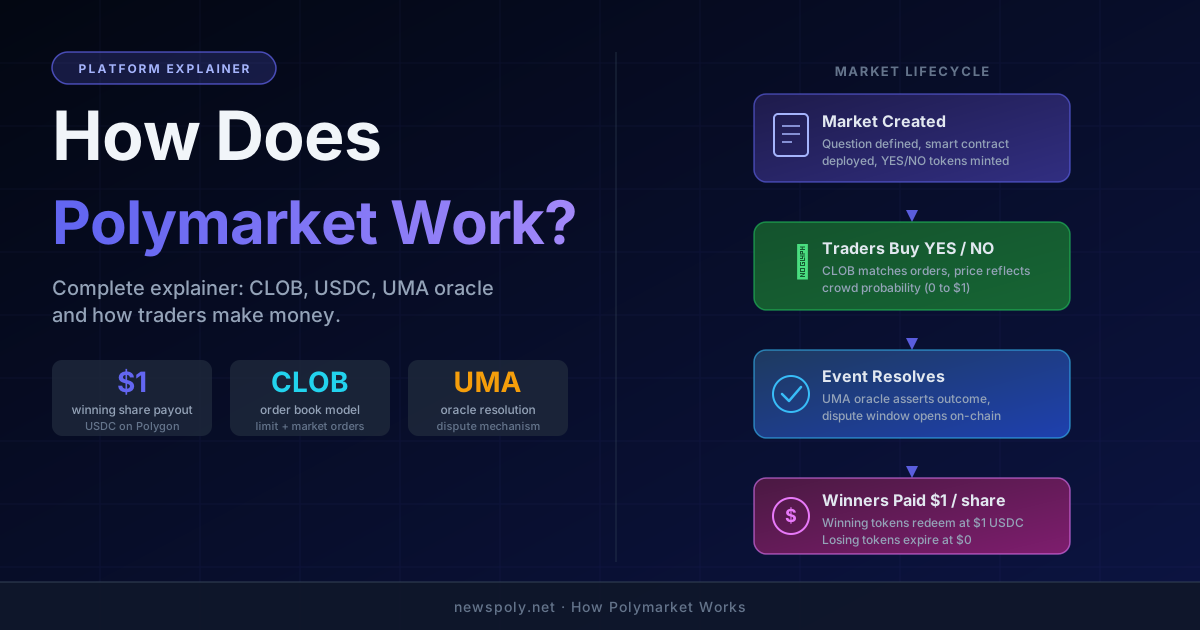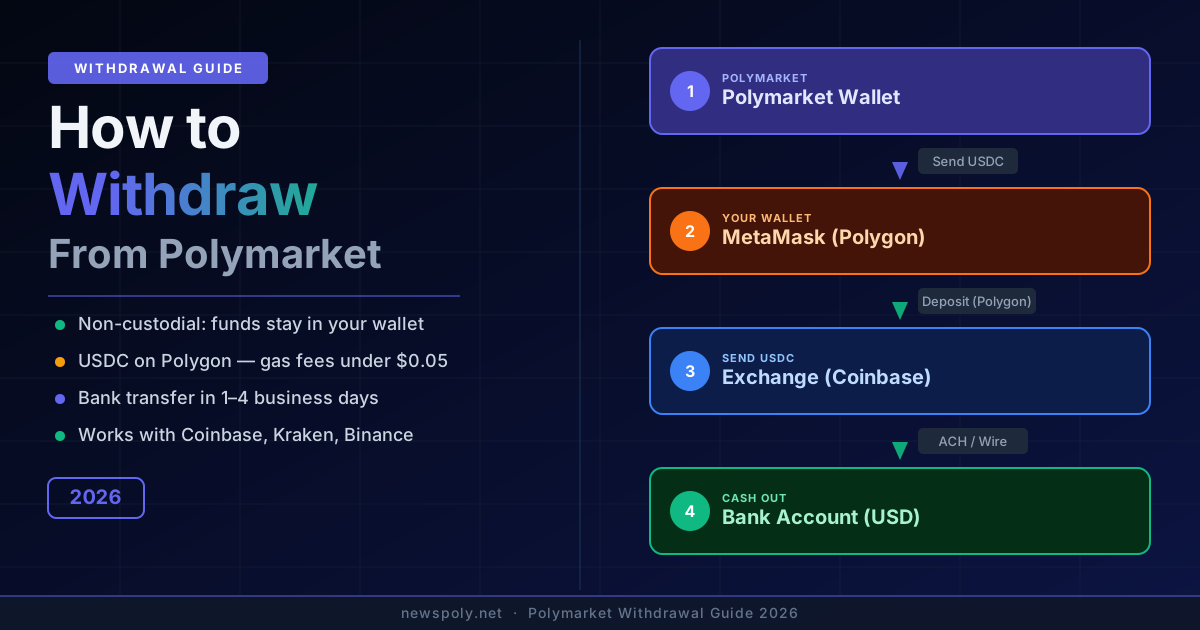
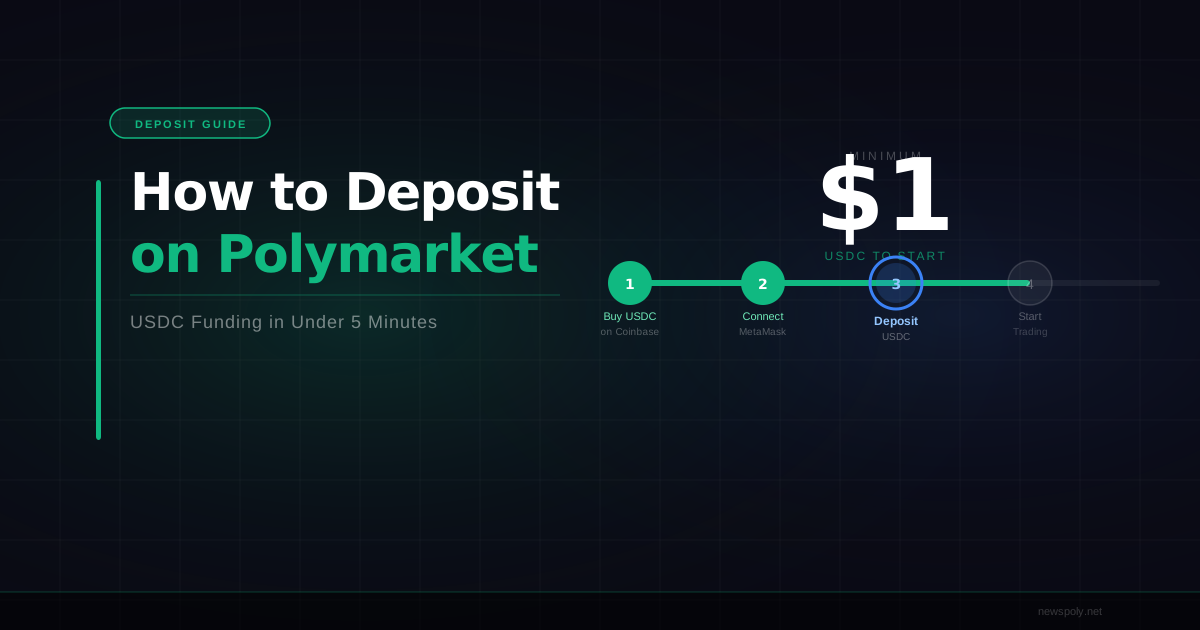
Depositing on Polymarket is not like funding a brokerage account. There is no platform login, no bank transfer form, and no "deposit" button in the traditional sense. Instead, you are moving USDC — a dollar-pegged stablecoin — onto the Polygon blockchain and into a non-custodial wallet that you control. Polymarket then reads your wallet balance directly. Once USDC is on Polygon in your wallet, you are funded. This guide covers every path to get there, from the simplest one-step Coinbase withdrawal to bridging from Ethereum, so you can choose the method that matches where your money already lives.
What "Depositing" Actually Means on Polymarket
Polymarket is a decentralised prediction market protocol. It does not hold your funds — your wallet does. When traders talk about "depositing on Polymarket," they mean two things happening together: your wallet is connected to the Polymarket interface, and that wallet holds USDC on the Polygon network. That is the entire setup. No KYC, no account creation, no waiting for a deposit to clear on Polymarket's side. The moment USDC arrives on Polygon in your connected wallet, it shows up in your Polymarket balance.
The currency is always USDC on Polygon. Not USDC on Ethereum, not USDT, not POL, not bridged USDC variants unless Polymarket specifically supports them. If you send the wrong token or the right token on the wrong network, your funds will not appear. Understanding this distinction upfront saves a lot of frustration. Our USDC on Polygon guide covers the token mechanics in depth if you want the full picture before moving money.
You also need a small amount of POL (formerly MATIC), Polygon's native gas token, in your wallet to pay for on-chain transactions. Polygon gas fees are extremely cheap — typically a fraction of a cent per transaction — but you need some POL to execute them. For a full breakdown of every transaction cost involved, see our Polymarket gas fees guide. More on exactly how much you need later.
Method 1: Coinbase Direct Withdrawal to Polygon (Easiest)
If you have USDC on Coinbase, this is the cleanest path. Coinbase natively supports withdrawals directly to the Polygon network, which means no bridge, no extra steps, and no Ethereum gas fees.
- Log in to Coinbase and go to your USDC balance.
- Click Send / Receive and enter your MetaMask wallet address (your 0x address). If you have not set up MetaMask yet, our MetaMask setup guide walks through the full process.
- Before confirming, look for the network selector. Change it from Ethereum to Polygon.
- Enter your USDC amount, review the fee (Coinbase charges a small withdrawal fee, typically $0 to $1 depending on account type), and confirm.
- The USDC arrives on Polygon in your MetaMask wallet within minutes. No bridge needed.
This method is the most recommended for first-time depositors. The only caveat: you also need a small POL balance for gas. Coinbase also allows you to withdraw POL directly to Polygon, so you can do both in one session. Send roughly $2 to $3 worth of POL alongside your USDC deposit and you will have enough gas for hundreds of transactions.
Already funded and ready to trade smarter? PolyCopyTrade automatically mirrors the positions of top-performing Polymarket traders into your wallet. Connect once, copy continuously.
Method 2: Binance Direct Withdrawal to Polygon
Binance also supports direct USDC withdrawals to Polygon, making it another one-step option for funded Binance users.
- Go to your Binance wallet and select Withdraw under USDC.
- Paste your MetaMask wallet address into the recipient field.
- Under Network, select Polygon (MATIC). This is critical — Binance defaults to BNB Chain or Ethereum, and sending on the wrong network means your funds will not appear in Polymarket.
- Enter your amount and confirm. Binance typically charges a fixed withdrawal fee (around $1 USDC at time of writing, but always check the current fee displayed in the interface).
- Funds arrive on Polygon within a few minutes after Binance's standard confirmation window.
As with Coinbase, send a small POL withdrawal separately to cover gas. Binance supports POL withdrawals on the Polygon network as well. Select the same Polygon network when withdrawing POL and it will land in your wallet ready to use.
Method 3: Kraken or Other Exchange via Ethereum Bridge
Not every exchange supports direct Polygon withdrawals. Kraken, for example, supports USDC withdrawals but only on the Ethereum network. If your exchange does not list Polygon as an option, your path to Polymarket requires one extra step: bridging from Ethereum to Polygon.
- Withdraw USDC from your exchange on the Ethereum network to your MetaMask wallet. You will pay Ethereum gas fees here, which can range from $2 to $20+ depending on network congestion. This is the main cost downside of this route.
- Once USDC arrives in your MetaMask on Ethereum, visit the Polygon Bridge at wallet.polygon.technology or a third-party bridge like Across Protocol or Stargate Finance.
- Connect your MetaMask wallet, select USDC as the asset, and choose Ethereum as the source and Polygon as the destination.
- Approve the token, confirm the bridge transaction, and wait. Most bridges complete in 10 to 30 minutes. The Polygon native bridge can take up to an hour.
- Once USDC arrives on Polygon, you also need POL for gas. If you do not already have POL on Polygon, you can swap a small amount of USDC for POL on a Polygon DEX like QuickSwap, or use a faucet if you are moving very small amounts.
This method costs more in fees and takes longer, but it works for any exchange that supports Ethereum USDC withdrawals. See the fees guide for a full cost breakdown across methods.
Method 4: Already Have USDC on Ethereum? Bridge Directly
If you already hold USDC in a wallet on Ethereum (whether from a previous trade, a DeFi position, or a past withdrawal), you can bridge it to Polygon without going back through an exchange.
The two most common options are:
- Polygon Bridge (official): Go to wallet.polygon.technology/bridge, connect your wallet, and bridge USDC from Ethereum to Polygon. The official bridge is the most trustless option but is slower — expect 45 to 90 minutes for funds to arrive.
- Third-party bridges (Across, Stargate, Hop Protocol): These are faster (often under 10 minutes) and charge a small fee for the speed. They use liquidity pools rather than the canonical bridge mechanism. For amounts under $5,000, third-party bridges are usually the better choice for time efficiency.
You will need ETH in your Ethereum wallet to pay bridge transaction gas fees. Once USDC lands on Polygon, repeat the POL gas acquisition step: either swap a tiny amount on QuickSwap or add POL directly from an exchange.
Method 5: Buy USDC Directly Inside MetaMask via MoonPay or Transak
MetaMask has a built-in buy feature that integrates with on-ramp services like MoonPay and Transak. These allow you to purchase USDC directly with a credit card, debit card, or bank transfer and have it land on Polygon automatically. No exchange account required.
- Open MetaMask and ensure you are on the Polygon network (not Ethereum).
- Click Buy and select your preferred on-ramp provider (MoonPay, Transak, or others listed).
- Select USDC as your asset, enter your fiat amount, complete identity verification (KYC is required by these providers), and pay.
- USDC is delivered directly to your Polygon wallet address, typically within 10 to 30 minutes.
This method is the most accessible if you do not have an existing crypto exchange account, but it typically carries the highest fees — often 2% to 4% over spot price plus payment processing fees. For occasional use or small amounts, it is convenient. For regular deposits, the exchange methods above are more cost-efficient. These on-ramp services also handle POL for gas in some cases; check whether your chosen provider offers a "gas top-up" option during checkout.
Funded and not sure what to trade? Skip the research grind. PolyCopyTrade lets you automatically follow Polymarket’s most profitable traders in real time. Your capital, their edge.
How Much USDC Do You Actually Need?
There is no Polymarket-imposed minimum deposit, but practical economics create a soft floor. Based on the platform mechanics, here are realistic starting amounts:
- $20 to $50: Enough to test the platform and place a few real trades. You will not build meaningful returns at this level, but you will learn how everything works without risking significant capital.
- $100 to $200: The practical entry point for real trading. You can run several positions simultaneously, experience actual wins and losses, and start developing a process.
- $500+: Where disciplined position sizing and diversification become genuinely useful. At this level you can allocate 5% to 10% per trade, hold multiple positions, and absorb variance without your bankroll becoming psychologically limiting.
For the full breakdown of what each deposit tier unlocks, our minimum deposit guide covers every scenario in detail. If you are completely new to the platform, the Polymarket beginner guide explains how to get started from scratch once your wallet is funded.
On top of your USDC, budget $2 to $5 worth of POL for gas. At Polygon’s typical gas prices, this covers hundreds of transactions. You can check the current cost of POL on any major exchange before deciding how much to add.
Confirmation Times by Method
How long does each method take from initiating the transfer to seeing funds in Polymarket?
- Coinbase to Polygon USDC: 5 to 15 minutes. Coinbase processes withdrawals in batches; most arrive within 10 minutes during off-peak hours.
- Binance to Polygon USDC: 5 to 20 minutes. Binance may add a brief internal review window for first-time addresses.
- Ethereum USDC via third-party bridge: 5 to 30 minutes depending on bridge and Ethereum congestion.
- Ethereum USDC via Polygon native bridge: 45 to 90 minutes. The official bridge uses a challenge period for finality.
- MoonPay / Transak: 10 to 40 minutes. Card purchases may include a short fraud review period on first transactions.
In all cases, you can monitor your incoming USDC on polygonscan.com by searching your wallet address. Once the transaction shows as confirmed (1 block confirmation is typically sufficient for Polygon), the balance will reflect in MetaMask and Polymarket within seconds.
Common Mistakes to Avoid
Most deposit failures come down to a small number of avoidable errors:
Sending to the Wrong Network
Sending USDC on the Ethereum network when Polymarket expects it on Polygon is the most common mistake. The funds are not lost — they exist in your wallet, just on the wrong chain. You can still bridge them across to Polygon after the fact, but it costs extra gas and time. Always double-check the network selector before confirming any withdrawal.
Forgetting POL for Gas
USDC arrives but you cannot trade because every on-chain action requires a tiny POL fee. The fix is simple: send $2 to $3 worth of POL to your wallet at the same time you send your USDC. Do not skip this step, especially on first deposits. Without gas, your wallet is funded but completely non-functional on Polygon.
Sending Non-USDC Tokens
Polymarket only accepts USDC. Sending USDT, DAI, BUSD, or any other stablecoin will result in a balance that Polymarket simply does not recognise. You would need to swap those tokens for USDC on a Polygon DEX before trading. Always confirm the exact token ticker before withdrawing from an exchange.
Sending to the Wrong Wallet Address
Crypto transactions are irreversible. Triple-check your wallet address before sending. Copy and paste rather than typing it manually, and verify the first and last four characters after pasting. If you are sending a large amount for the first time, consider a small test transfer first.
FAQ
Can I deposit on Polymarket with a credit card?
Not directly through Polymarket, but you can use MoonPay or Transak within MetaMask to buy USDC on Polygon with a card. Expect fees of 2% to 5% and a KYC process from the on-ramp provider. Some users also buy USDC on Coinbase with a card and then withdraw to Polygon, which is often cheaper overall.
Can I deposit from Coinbase Wallet (not the exchange)?
Yes. Coinbase Wallet is a non-custodial wallet, similar to MetaMask, and can hold USDC on Polygon. If you already have USDC on Polygon inside Coinbase Wallet, you can connect it directly to Polymarket without any transfer. If your USDC is on Ethereum inside Coinbase Wallet, you will need to bridge it to Polygon first using one of the methods described above.
What if my funds don't arrive?
First, check polygonscan.com with your wallet address to see if the transaction is confirmed on-chain. If it shows as confirmed but your MetaMask balance is not updated, try refreshing the token list in MetaMask or adding USDC as a custom token with the Polygon USDC contract address. If the transaction is not showing on Polygonscan, check your sending exchange for the withdrawal status — it may still be pending their internal processing. Most exchanges allow you to view transaction history with a block explorer link once the withdrawal has been broadcast. If the transaction was sent on the wrong network, your USDC still exists — just switch your MetaMask network to the correct chain to see it.
Is there a maximum deposit?
Polymarket has no deposit cap. You can deposit any amount of USDC your wallet holds. For very large amounts (five figures or more), consider spreading the deposit across two or three transactions rather than one to reduce the risk of a single transaction issue.
Deposit done. What next? PolyCopyTrade puts your USDC to work immediately by copying Polymarket’s top traders proportionally. No research required — connect your wallet and let the platform do the work.